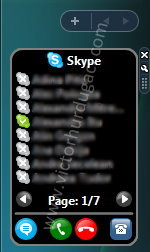
Skype Gadget 2 Alpha 1 is available for download!
- Features
- System requirements
- Installation
- Download
- Running on Vista x64
- Future version
- Contact
- Donation
- Changelog
SkypeGadget is a Windows Vista Sidebar Gadget that allows Skype users to call/chat to their contacts directly from Sidebar.
1. Features
- Contact list
- Show/hide offline, SkypeOut and/or Call Forward contacts
- Call/chat to a contact
- End call
- Open Skype
- Two display modes (8 or 16 contacts at a time)
- Double click starts a chat/call
- Displays contact status (Available, SkypeMe, Away, etc.)
2. System requirements
- Windows Vista
- Skype
- Internet connection
- Administrative rights on the first run (in order to register Skype4COM)
3. Installation
- Download the gadget from one of the links below.
- Run the file
- If, on the first run, it displays a message that Skype4COM is not registered click the link on the gadget, close the gadget and reopen it.
- That’s it.
4. Download
The current stable version 1.3 can be downloaded from victorhurdugaci.com or gallery.live.com (The official Sidebar Gadgets page from Microsoft).
5. Running on Vista x64
Skype Gadget uses Skype4COM.dll in order to communicate with Skype. This component can only run on 32 bits so in order to use the gadget on a 64 bits OS you need to run the Sidebar as a 32 bits application.
This can be done as following:
- Go to the sidebar properties and uncheck the “Start sidebar when windows starts” checkbox.
- Open the “Program Files (x86)Windows Sidebar” folder and launch the sidebar from there. Now you have the 32 bits version running.
- Go to this new sidebar’s properties and check “Start sidebar when windows starts”.
- Add th gadget on sidebar.
Thanks to Michael for this great tip!
6. Future version
The Alpha 1 version is now available for download!
Get it from here and please provide feedback.
7. Contact
If you have any problems and/or suggestions for SkypeGadget please feel free to add a comment on this page or send me an e-mail: contact [at] victorhurdugaci.com
8. Donation
Like this gadget and want to support it?
9. Changelog
Version 2.0 Alpha 1
- First release of the new interface.
- New contact list.
- Hide Skype window after placing a call.
- Contacts are sorted by status and name.
Version 1.3:
- Bug fix: Long contact name wrapping
- New color for selected item
- Option to show/hide SkypeOut contacts
Version 1.2:
- Big contact list option
- Sorted contacts
- Minor bug fixes


Related Articles
24 users responded in this post
hi,
really love your gadget and it works fine on my laptop vista 32, but i cant get it to work on my desk top vista 64? it tells me it isnt registered… i click the link and restart it but it doesnt work…please help as i love it
thanks
Matt
Hi Matt,
Unfortunately this gadget won’t work on x64 because it is using Skype4COM (a component provided by Skype) which doesn’t have a 64 bit version yet.
Best regards.
Only problem with version 1.2 is that you cannot turn off SkypeOut contacts. Its usually useless to have them displayed. Even worse contact list isnt ordered by type of contact, so I end up with mixed list of regular online skype contacts and SkypeOut contacts, several pages long. And some online contacts are i.e. on page 7/9. Can you make version like 1.3 with SkypeOut contacts turned off, before v 2.0 is done please. :-) Otherwise great gadget, thanks.
I have the same problem as the 2 posters above. I have 64-bit vista as well and can’t seem to register it. I would really like to use this gadget as I use skype quite frequently.
Unfortunately, Skype4COM will not run on any x64 operating system until next year. If you want to monitor the status of Skype4COM x64 development follow this link.
I will try a work around and see I can make the gadget run on x64.
I am running on 32bit Vista on my Acer 5100 laptop, nothing seems to register, installed it twice. Runs in bar but displays nothing )-: Does it require the IE Skype Plugin?
Garrett:
Is Skype running? Did you click “register” on the first run?
Hello all x64 Vista users out there.
As mentioned correctly above, the Skype4COM dll runs only in 32 Bit mode. If you want to use the gadget, you will have to start the sidebar in x32 mode.
This can be done as follows:
* go to the sidebar properties and uncheck the ‘Start sidebar when windows starts’ checkbox.
* go to the ‘Progam Files (x86)’ folder and there to the ‘Windows Sidebar’ folder. This is the x32 Version of the sidebar (The x64 version resides under ‘Program Files’). Launch the sidebar from there
* Go to the properties again and check the autostart checkbox. From now on, the x32 Version will be started instead of the x64 one.
Now, you can add the gadget as usual. Enjoy.
BTW, thanks for the great gadget!
Michael
Michael, you are the best :)))
BIG THANKS!!!
Works great :)
Hi, this is a great gadget. Skypegadget 2 looks cool, but I do hope you will keep the version 1 as a download. I really don’t want ALL my skype-functions in my sidebar, I just want most used functions which takes as little space as possible - for that your version 1 is perfect.
(You might consider still offering a light version - or having the tabs as a setting?)
Great job, thanks
Hi there,
Great gadget! Is it possible to sort the contacts by status? I use Skype a lot at work but would prefer to see the 5 or 6 contacts that are on line for my work group, rather than sorted alphabetically.
Thanks! Lindsay
Hello again,
Any timescales for release of V2?
Regards, Lindsay
@Lindsay:
Sorting by status is not possible in the current version. I will take this into account for v2.
What do you mean by “timescales” ?
Best regards!
very nice indeed
create job, really
i like your gadget, the first gadget that make sence to use.
About timescales, i guess Lindsay want to know when the v2 will be finshed.
why is my comment deleted?
so again,
great tool, many thanks for that.
When will v2 be available?
Your comment was not deleted, it was waiting for approval :)
V2 will probably be available in a 2-3 weeks
Will V2 also be able to send sms to the skypeout-contacts ?
Oliver, I will take your idea in consideration but I can’t tell you if this will be a feature or v2
i love the skype gadget i have few idea’s for the newest version if it ever be released
1. status change
2. skin change (optional)
3. search skype (optional)
4. background change (optional)
awesome job
Also can you add micro size skype dial buttons so when someone press the keys skype will auto dial
it doesn’t seem to work with skype 4 beta
I have just loaded you skype sidebar.
Calling is fine but I cannot get chat to work.
I have checked the box in option which says double click starts chat, but nothung comes up to type into
Is this possible yet or in the next version?
Leave A Reply
Please write the reply in English