Nov 3rd, 2012: SkypeGadget has been discontinued.
Read more about this and see the SkypeGadget memorabilia, here. SkypeGadget will remain available for download on this page.
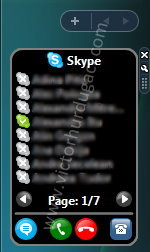
- Features
- System requirements
- Installation
- Download
- Running on Windows on 64bits
- Future version
- Support and feedback
- Donation
- Changelog
SkypeGadget is a Windows 7/Vista Sidebar Gadget that allows Skype users to call/chat to their contacts directly from Sidebar.
1. Features
- Contact list
- Show/hide offline, SkypeOut and/or Call Forward contacts
- Call/chat to a contact
- End call
- Open Skype
- Two display modes (8 or 16 contacts at a time)
- Double click starts a chat/call
- Displays contact status (Available, SkypeMe, Away, etc.)
2. System requirements
- Windows 7 or Windows Vista
- Skype
- Internet connection
- Administrative rights on the first run (in order to register Skype4COM)
3. Installation
- Download the gadget from one of the links below.
- Run the file
- If, on the first run, it displays a message that Skype4COM is not registered click the link on the gadget, close the gadget and reopen it.
- That’s it.
4. Download
The current stable version 1.4 can be downloaded from
victorhurdugaci.com or gallery.live.com (The official Sidebar Gadgets page from Microsoft).
Running on Windows on 64bits
Skype Gadget uses Skype4COM.dll in order to communicate with Skype. This component can only run on 32 bits so in order to use the gadget on a 64 bits OS you need to run the Sidebar as a 32 bits application.
This can be done as following:
- Go to the sidebar properties and uncheck the “Start sidebar when windows starts” checkbox.
- Open the “Program Files (x86)Windows Sidebar” folder and launch the sidebar from there. Now you have the 32 bits version running.
- Go to this new sidebar’s properties and check “Start sidebar when windows starts”.
- Add th gadget on sidebar.
Thanks to Michael for this great tip!
6. Future version
The Alpha 1 version is now available for download!
I decided to not develop version 2 anymore because a lot of people are using version 1 and there seems to be no need for an improved version.
You can still download version 2 Alpha1 from
here.
7. Support and feedback
If you have any problems and/or suggestions for SkypeGadget please feel free to …
- … add a comment on this page
- … send an e-mail at: skypegadget [monkey tail] victorhurdugaci {dot} com
- … follow SkypeGadget on Twitter: @SkypeGadget
8. Donation
Like this gadget and want to support it?
Donations removed due to legal reasons. However, SkypeGadget is still free :)
9. Changelog
Version 1.4 (yes, it is after 2.0 A1)
- Support for Skype 4
Version 2.0 Alpha 1
- First release of the new interface.
- New contact list.
- Hide Skype window after placing a call.
- Contacts are sorted by status and name.
Version 1.3:
- Bug fix: Long contact name wrapping
- New color for selected item
- Option to show/hide SkypeOut contacts
Version 1.2:
- Big contact list option
- Sorted contacts
- Minor bug fixes
hi,
really love your gadget and it works fine on my laptop vista 32, but i cant get it to work on my desk top vista 64? it tells me it isnt registered… i click the link and restart it but it doesnt work…please help as i love it
thanks
Matt
Hi Matt,
Unfortunately this gadget won’t work on x64 because it is using Skype4COM (a component provided by Skype) which doesn’t have a 64 bit version yet.
Best regards.
Only problem with version 1.2 is that you cannot turn off SkypeOut contacts. Its usually useless to have them displayed. Even worse contact list isnt ordered by type of contact, so I end up with mixed list of regular online skype contacts and SkypeOut contacts, several pages long. And some online contacts are i.e. on page 7/9. Can you make version like 1.3 with SkypeOut contacts turned off, before v 2.0 is done please. :-) Otherwise great gadget, thanks.
I have the same problem as the 2 posters above. I have 64-bit vista as well and can’t seem to register it. I would really like to use this gadget as I use skype quite frequently.
Unfortunately, Skype4COM will not run on any x64 operating system until next year. If you want to monitor the status of Skype4COM x64 development follow this link.
I will try a work around and see I can make the gadget run on x64.
I am running on 32bit Vista on my Acer 5100 laptop, nothing seems to register, installed it twice. Runs in bar but displays nothing )-: Does it require the IE Skype Plugin?
Garrett:
Is Skype running? Did you click “register” on the first run?
Hello all x64 Vista users out there.
As mentioned correctly above, the Skype4COM dll runs only in 32 Bit mode. If you want to use the gadget, you will have to start the sidebar in x32 mode.
This can be done as follows:
* go to the sidebar properties and uncheck the ‘Start sidebar when windows starts’ checkbox.
* go to the ‘Progam Files (x86)’ folder and there to the ‘Windows Sidebar’ folder. This is the x32 Version of the sidebar (The x64 version resides under ‘Program Files’). Launch the sidebar from there
* Go to the properties again and check the autostart checkbox. From now on, the x32 Version will be started instead of the x64 one.
Now, you can add the gadget as usual. Enjoy.
BTW, thanks for the great gadget!
Michael
Michael, you are the best :)))
BIG THANKS!!!
Works great :)
Hi, this is a great gadget. Skypegadget 2 looks cool, but I do hope you will keep the version 1 as a download. I really don’t want ALL my skype-functions in my sidebar, I just want most used functions which takes as little space as possible – for that your version 1 is perfect.
(You might consider still offering a light version – or having the tabs as a setting?)
Great job, thanks
Hi there,
Great gadget! Is it possible to sort the contacts by status? I use Skype a lot at work but would prefer to see the 5 or 6 contacts that are on line for my work group, rather than sorted alphabetically.
Thanks! Lindsay
Hello again,
Any timescales for release of V2?
Regards, Lindsay
@Lindsay:
Sorting by status is not possible in the current version. I will take this into account for v2.
What do you mean by “timescales” ?
Best regards!
very nice indeed
create job, really
i like your gadget, the first gadget that make sence to use.
About timescales, i guess Lindsay want to know when the v2 will be finshed.
why is my comment deleted?
so again,
great tool, many thanks for that.
When will v2 be available?
Your comment was not deleted, it was waiting for approval :)
V2 will probably be available in a 2-3 weeks
Will V2 also be able to send sms to the skypeout-contacts ?
Oliver, I will take your idea in consideration but I can’t tell you if this will be a feature or v2
i love the skype gadget i have few idea’s for the newest version if it ever be released
1. status change
2. skin change (optional)
3. search skype (optional)
4. background change (optional)
awesome job
Also can you add micro size skype dial buttons so when someone press the keys skype will auto dial
it doesn’t seem to work with skype 4 beta
I have just loaded you skype sidebar.
Calling is fine but I cannot get chat to work.
I have checked the box in option which says double click starts chat, but nothung comes up to type into
Is this possible yet or in the next version?
Hi there,
Whenever I use the dialpad to enter numbers the +1 is always prepended to the number. My default countrycode is +44, is there any way to change the default location setting?
Thks
says skype is not running and/or logged in but doesnt give me a log in option
Some problems to transfer the contacts.
I have the same problem as Tina
[...] 3656 page views for SkypeGadget [...]
Hey there,
wonderful gadget (Skype Gadget),
but I have been searching like a madman for a gadget that combines MSN and Skype. It doesn’t exist.
a Gap in the market? Maybe a good opportunity to do something about it, I know a lot of people that use skype but won’t install msn on theit computers due to the security holes,… but sometimes you need to communicate to somebody else and most of the WWW community is sadly using MSN messesnger :-(
Hi..
This seems a great and useful gadget but why does it needs 50% of CPU on every update (5seconds)?
On every 5 seconds it refreshes the contact list. That’s why the CPU Load goes to 50%.
I’m sorry about that but I don’t have control over Skype4COM.
After trying alpha I didn’t like the scroll bar and I was unable to change the size of the bar or customise it re hide offline contacts etc. Uninstalled and reinstalled v1.3 but now v1.3 is not loading.
Installed v1.3 as for a single user and now is showing and working.
cool..!!!
Love 1.3
2 alpha 1 I uninstalles it because:
1) no settings menu, so I could not use any filtering
2) contact list looks messy (my screen res is 1600×1200)
3) hate the new color scheme
Thanks, keep up the good work, as 1.3 is way better than anything else made by other developers.
hi!
I really love your gatget. I decided to change to windows sidebar because of it.
But is it possible to add a adjustment like “sort by alphabet…. by status (online/ absence/ offline)”?? then your gatget would be perfect for me.
Thanks!
I am using 1.3. When switch pages, it takes more time to refress. also improve the page scrolling with mouse scrolling.
Option should be there for nunber of contact to display.
Hi,
I am using 1.3.
The gadget is very good.
When switch pages, it takes more time to refress. also improve the page scrolling with mouse scrolling.
Option should be there for nunber of contact to display.
Don’t feel bad. This is what i need from this gadget.
Thanks.
great app! would like to see a text box for searching contacts as in skype gui
Hey, dont know if this has been suggested before, but it would be cool to be able to only show contacts from a specific group from skype. That way I could make a skype group of all my favourite numbers/contacts and have the gadget display those only for easy calling. Great gadget by the way, made me enable the sidebar again :)
hi……….
i use this app. and this is verry special gadget
No matter what I do I get the following massage on both versions: Skype is not runnig or not isigned in.
I am runnig skype and it is signed in.
@JFS:
What version of Vista are you running?
The operating system is 32 or 64 bits?
What version of Skype are you running?
i have the same problem as jfs
vista-home premium
32-bit
version 4.0.0.206
SkypeGadget is not supporting, yet, Skype v4.
Sorry. Hope will have time soon to fix this
HI Victor,
Your Skype gadget is the best by far!!!! Today I installed Skype 4 and of course I can now see from these messges that it does not work with yur fabulous gadget. Hope you can make it work soon. Its only been 3 hours without your gadget and I cant believe how much i miss it. I knew i used it a lot but like a junkie I need it back working. Please help.
Hi Victor,
I’ve figured out how to fix both versions of your gadget to work with Skype V4.0.0.206. All anyone needs to do is download the latest version of the Skype4COM from here:
https://developer.skype.com/Download?action=AttachFile&do=get&target=Skype4COM-1.0.31.0.zip
Then run your \regwrapper.bat\ file to register the new .dll
And bingo both gadget versions work again.
Thanks for the wicked gadgets!!!!
Cheers,
Josh
Hi Josh,
Is it possible to give more detailed step by step instructions? I have download the zip file to desktop but what do you do from there exactly?
Thanks
Jon
hi i am just trying out.
Update for Windows Vista KB959772
This update to the DRM crashed my SkypeGadget, i.e. didn’t show Skype as running or logged in! Only after doing a System restore to before the update did it work again.
Love the Gadget btw.
Sorry for the last post, too many things updated in succession, after a closer look the BlueSoleil 6.4.249.0 Software Update is the culpret…
[...] Comments Stuart25 on SkypeGadgetStuart25 on SkypeGadgetAkshay on [...]
SkypeGadget is now supporting Skype 4!
Does it support Windows7? :)
Super cool! Congratulations with this gadget!
Quote: Does it support Windows7? :)
I don’t know. Haven’t tried it.
If you tried could you give me some more info?
I have been using 1.3 then 1.4. I like Alpha 1 and hope that I will have the same settings customization as with 1.4 (do not display users who are off-line, etc.). Suggestion: Offer the choice of background colors. I prefer the black background.
Hey, great work. I like your gadget. But please, make the contact list resizeable. I cant use it like this. It’s too big. I usualy have 2 or 3 contact online, I don’t need so much space. Thanks in advance ;)
The gadget (V1.4) always seen to miss a couple of my contacts. It can show 8 at a time and I have 10 contacts. It shows Page 1/1 when I expected it to show 1/2 and let me move to page 2.
Other than that I like it.
@Simon: Could you tell me if the two contacts that do not appear have a special status like (skype out) or they are from outlook contacts?
@everyone: I am taking notes with your requests. However until July I cannot upgrade SkypeGadget because I must work on my bachelor thesis/project.
I love the app, but one thing I am struggling with is new chat notification. Skype 4 plays a sound, and the system tray icon changes, but it is hard to notice. I was hoping your app would provide some notification of incoming chat/calls or missed chat/calls (change background color or change the S and Skype text in the header area). Any plans for this? Thanks for the app!
I have installed the gadget V1.4, but if i start it, it shows only an error that “Skype4COM.dll is not registered. If you have administrative rights, click the link below in order to register this file.”
My System is Vista32 and i am logged as administrator.
After click the link there comes the message that restart of the gadget needed. Done it, but it shows the first error message again.
Then i have downloaded the newest Skype4COM.dll (Skype4COM-1.0.31.0) and copy it into the wrapper directory. After that i start the batch to register it. Done, with no errors.
I started the gadget again, but it shows me the same error as before – again and again.
What can i do to get run the gadget??
a am hire
Thanks for your Gadget!
1.4 runs well on Vista 32 with Skype 4.0.0.226
2.0 alpha doesn’t work on my system. I only see my contacts for a second after I hit the list-button with a left-click. After that they are all invisible for me again.
Thanks LCD for your notification. I forgot to update 2.0 alpha to the latest SDK. Will do this soon
Seems like a great gadget, wish I could get it installed. The directions DO NOT WORK for me on Vista 64 bit modifications. Just a bunch of frustration.
Now the codes need some work TOO! What jibberish, even with 20/20.
I would like to see a MUTE button.
This would be extremeley handy when using Skype for conference calls, which I do a lot!
cheers! And keep up the good work!
Nice gadget, one of my favourites. (version 1.4)
I have only one problem with it. Every few seconds, when it gets its data from Skype, it puts quite a strain on my single core CPU which makes video stutter (even with CPU usage maxing out below 70%) . If I set the sidebar’s priority to low the problem is solved. Maybe a future version can improve on this.
[...] SkypeGadget [...]
Nice gadget, however, be aware that in Windows 7, there is not the option to change the version of the sidebar that runs at startup in the same method as with Vista. You must make registry changes, and running the 32-bit version will prevent some of the Microsoft gadgets that ship with Windows 7 from running (such as the weather app). Is there any way to create a 64-bit version of the dll? Not sure what langauge you have written it in, or what calls you make, but adding “serializable” should allow it to work under 32-bit and 64-bit operating systems.
But apart from that, it is a nice application but I’m afraid I wont be using this gadget due to its incombatibility with 64-bit. Hopefully this can be sorted though, and I wish you all the best in this endevour.
Regards,
Andy
[...] What is Windows Azure? | Ex nihilo nihil fit on Windows Azure Application ArchitectureAndy on SkypeGadgetMarius on Windows Mobile “Storage Card2″ [...]
Hi.
I tried v1.4 on Vista 64, but got the DLL registration issue, and couldn’t get past that.
I also tried the alpha version. When opening it, it used up 100% CPU resource for a few seconds, then stated that Skype wasn’t running, even though it was.
I think this looks like a really useful tool – but alas, not yet on Vista 64 :-(
no
free telephone operation.
plz make easy to fill
Yes, I’d like a Windows 7 64 bit version as well. Any chance soon?
Can you let me know?
Thanks
John
anyone else having trouble ending calls? Is it a windows 7 thing? Also, is Skype supposed to be runnng at the same time as the Skype gadget?
Hello jon,
Yes, Skype needs to run all the time you want to use the gadget.
Can you be more specific about your problem? What is not working? What is the version of Windows 7 you are using?
Hi! Nice Gadget! Where can I get the source for it?
@Zorgoban: change the .gadget extension to .zip
Is it working on Window 7?
@Peter Au: Yes, is working (version 1.4)
The current Skype desktop widget does not auto-refresh in Windows 7 Professional. I need to right-click, select options then exit for it to update. I tried uninstalling and reinstalling with the same results. By the way, how do I check the version number?
@Flashfox: right click the desktop, go to gadgets and check there the version of SkypeGadget
I cannot get version 1.4 to work on my laptop at all. I click the link a box flashes on the screen and I close and restart the gadget. I get the same message about registering. I am running Windows 7 and yes everything is up to date. I just bought this laptop this week.
Purplepooki, are you using a 64 bit version of Windows?
For 64 bit Windows 7
1. open Task Manager and end Process sidebar.exe
2. Open the “Program Files (x86)Windows Sidebar” folder and launch the sidebar from there. Now you have the 32 bits version running
3. Add th gadget on sidebar.
Thank you I will give it a try.
to Langi2k thx man u got the solution to win7 64bit
For 64 bit Windows 7
1. open Task Manager and end Process sidebar.exe
2. Open the “Program Files (x86)Windows Sidebar” folder and launch the sidebar from there. Now you have the 32 bits version running
3. Add th gadget on sidebar.
this worked on my comp
Ran 1.3 and 1.4 but they never let me hang up the phone when I click on the red handset.
I can call out but have to use the Skype interface to hang up not this gadget.
Am I the only one? I didn’t see anyone else talking about this.
Running Windows 7 x32 Ultimate. Thanks.
…..im using windows 7 and skype 4.2.0.158 and gadget 1.4……everytime i restart my comp, i got to restart the skype gadget…..can u guys plz do something about it….the gadget doesnt detect once skype is connected to the net…….
windows 7 – 64 bit forever loop trying to register dll – not functional. Should be a separate installer that raises access level request.
hi i’m trying to run this sidebar & have tried to set it up to run the 32-bit way, it still brings up a message saying to register the file. however, the link doesn’t work. how can i get this thing running!? helP!!!
Running Windows 7 Professional x86 and the application was running fine until the last reboot. Since then I receive a message that it is not registered, to close the gadget and restart it. Done this several times and even rebooted with the same result. Any ideas as to what I might be missing?
Any new information regarding Skype4COM.dll? Keeps on telling me it not registered. Used to work fine until May 3rd (rebooted then lost it). As noted in my earlier message, I am running Windows 7 Professional x86.
@Flashfox: I don’t know how to reproduce your problem. You could try registering the DLL manually by running “regsvr32″ in a console with administrative privileges and passing the Skype4COM.dll as argument. That’s the only possible solution I have.
What happened in the session from May3rd before rebooting? Any major changes in the OS?
BTW, what version of SkypeGadget are you using?
Good Gadget…
But I wish there would be a option for sorting contact with status,
as if I hide offline contact, the person who is invisible but i know he/she is online so to call them I have to goto skype and call them.
for some reason it dosen’t work for windows 7
hi, i use windows 7, and when i click the link to register, then close the gadget, re open, nothing happen. The message is always the same, that i must click the link to register. i use skype gadget 1.3. pls help…
@lina: Please use the latest version of the gadget (1.4). Then, you should be able to register the COM component.
sorry if my question sounds silly, but i have already succeed to install and register it, but the message is ‘skype is not working and / or not logged in’
what should i do?
Lina, what version of Skype and Windows are you using?
i have the same Problem i can not register the skype4com.dll I am running Windows Ultimate 64 and skype 4.2 (newest Version) and skype gadget 1.4 i registert as admin but still no luck
it is nice
[...] work Then after a search on good old Google, I found v.1.4 of the gadget that does work! See http://victorhurdugaci.com/projects/skypegadget. Oh BTW you can catch me on Skype under the name Palmtopman, well it had to [...]
Help!! I just download latest skype and this SkypeGadget and installed them! After I lauch SkypeGadget, my Gadget ” Platform” can not function. What’s wrong!!!
salam
Hi.I hope it will be helpfull.
Dear sir
I have windows 7 professional and me either not working I tried to register it (administrator user) but still gives me “Skype4COM is not registered”.
to Langi2k thx man u got the solution to win7 64bit
For 64 bit Windows 7
1. open Task Manager and end Process sidebar.exe
2. Open the “Program Files (x86)Windows Sidebar” folder and launch the sidebar from there. Now you have the 32 bits version running
3. Add th gadget on sidebar.
this worked on my comp
Thanks Victor you did it easy. But i wish it works every time with no hassle and with no repeating of above procedure every time i restart or log off and come in.
But in addition, i would like to tell u something..
I use windows home premium (64bit), i have pinned skype to task bar with auto start & auto log in everytime i start my comp (i live in UK, so wifi will help me to stay online always). So, i dont think i use this gadget most. But love the way designed and done.
To other friends who struggle with “Skype4COM is not registered”, i would ask you to try the above step, and so can help you. I had the same for long, i even tried 5time and got fedup. Then i was even ready to uninstall it, just then this forum helped me.
For all, who use the above steps and got worked out, plz re-post. So someone one who needs may be helped.
Like the gadget: Needs a couple of quick features.
1) a way to quick select it in phone mode so a clipped number can be pasted, or call a clipped number right away.
2) Ability to send tones for selecting extensions, entering info in automated systems.
3) Hang up button does not work with skype 5 (beta)
4) in contact list, ability to type 1 or 2 characters and have it display only contacts containing the sub-string (anywhere in the name)
Link to version 2 not working anymore.
Also needs to accept number pad keystrokes even if entry window is not selected. Send tones from keypad as well. :)
Does make quick calls easier though. Very nice.
To have the 32bit version of the sidebar starting with Windows:
1. Make sure the sidebar autostarts (goto properties and check the “Start sidebar when windows starts” checkbox).
2. Start regedit from the start menu.
3. In the left pane, go to HKEY_CURRENT_USER\Software\Microsoft\Windows\CurrentVersion\Run
4. In the right pane, right click on Sidebar and select Modify…
5. Change the Value data to C:\Program Files (x86)\Windows Sidebar\sidebar.exe /autoRun
by adding ” (x86)” (including the space) behind Program Files.
6. Exit regedit and restart your computer.
Hey I down loaded this desktop gadget because it seemed cool but I cant get it to run! I have window 7 64 bit. i click the link to register and then close the app then open it again and it keeps giving me the same instructions can you help me please?
It’s greate
Hi!
I click the link and restart the gadget but it doesent work. I have windows 7, please help
best ragards David
I like your gadget, thank you for the work! I would like to suggest a transparent version, with background like this: http://www.bitwizard.hu/dl/background-big.png
@Joco1114: Feel free to update the gadget file. You can also send it to me for review and if it looks good I will upload it here.
ihave not idea
@Viktor: Oh, sorry, I am very “undergraded” in gadgets programming. As I realized, it is not enough to swap backgrounds, but I have to use background.addTextObject function because of transparent backgrounds otherwise I got interesting result.
Here is an example:
http://www.bloodforge.com/post/Vista-Sidebar-Gadget2c-Transparent-Backgrounds2c-and-Font-Color.aspx
I LIKE IT!!!
I added the gadget and it worked for a day on Windows 7 and I think it is great but then after a restart it gave me the not registered message. I see the work around that people have posted here but will I need to do that every time I restart or is there a way to make it permanent? Thanks
Hi, Gadget not work with new skype version 5.1.0.104. Any idea?
I would really like to know when it will work with 5.1 just updated and this was the perfect gadget for me. I would love it to work again.
Your Sidebar Gadget (both 1.4 and alpha) worked great up until today. Skype v5.1 was released and it no longer works :( I am looking forward to the update. Many thanks for your hard work!!
The problem is the property SkypeObject.Client.IsRunning, it returns always false.
It is not possible to use SkypeObject.Client.Start() and wait for a while.
A dirty fix is to return always true from IsSkypeRunning. I think the API is not
working correct.
Yes, this truly has been a very helpful gadget, especially for someone living overseas. I communicate via skype daily, and knowing who is available via the skype gadget has been such a time saver. Looking forward to the update which gets the skype gadget up and running again with the latest version of skype! Thanks
Thanks for feedback guys! I will take a look, during the weekend, at the compatibility problems with the new version of Skype.
Stay tuned :)
Greetings from Bavaria/Germany …
how about a x64 Windows 7 Edition :-) … it would be great.
Guido from Germany
SKYPE has changed the version with 4 on 5… And gadget has ceased to work, and it is a pity. It was pleasant to me. Inform when will correct. I will necessarily download.
I agree with the above post. Updating to Skype v.5 breaks the gadget. Please fix soon, great gadget.
Installed it but did not get the register option (win7 32bit), reinstalled it but same problem, i don’t get the option to register … any help on this ?
all thumbs up for that gadget!
But, please fix that problem with the skype v5 version.
thx in advance
[...] There is a bug in the Skype client that affects SkypeGadget. See status and workaround here. [...]
Your workaround no. 3 works perfectly for me.
I can’t realize any negative effects.
Hey from Germany,
the hotfix is out: http://blogs.skype.com/garage/
… Today we have released a hotfix for Skype 5.1 for Windows.
The gadgets works now, no patches or workarounds to use!
I installed v5.1.0.112 but without workaround the gadget still doesn’t recognize if skype is running.
haha thiss is hard
i dont knw how to use this
Skype upgraded to v5.1.0.112 and now the gadget doesn’t recognize if skype is running. I followed instructions to launch on win7 64bit (using 32 bits version of sidebar.exe) to no avail. Any suggestions?
I had gadged version 1.2
Updatet skype to 5.1.0.122 and gadget failed to recognize skype running.
Updatet gadget to 1.4, but still fail.
Changed line 269 in gadget.js in “return true”
Now this gadget behaves normal. It now recognizes skype running and says that skype ist not running if skype is off or offline. Nice!
I love this gadget. Many thanks!
hi…
have tested the alpha-version on win7 64bit. think its not good. thousands of cmd-windows opens and eating the free memory. as i have 108 processes from there i shut down my pc.
the hint with line 269 not running for me. not in version 1.2 or in version 1.4
sidebar starting in 32bit ??? i havent a touchable sidebar… however, i can wait for newer skype or your gadget…
best regards
I have everyones solution and its very simple!! In Windows 7 i have 64 bit version.. click the start button and type gadget in the box, right click then run as ADMIN!! now run the skype gadget ;) no restart required it connected n syncd while i was on a call :)
how can i use this??? pls ans. icant do it……. argh
Thanks Victor for your cool gadget. I allowed myself to make some enhancements:
– Added option to sort contacts by status and name
– Moved “big list” function to “large size button” of Windows 7 sidebar.
– Update Skype4COM to new vesion
– Changed the background image
Link: http://filebeam.com/e5e5e34a31d004aa72b529bc71bd4107
Nice work Wilds! Maybe you could also change the old Skype “Away” moon crescent symbol for the newer “orange” away symbol which would be clearer in the gadget window.
Thanks
We love acronyms sites like Skype on Alqlari because it saves time and effort thanks to Skype, Windows 7 and 8
We are with the continued development of the system desktop gadget gallery because it saves time and effort Thanks to all based on this development
Posted on Saturday, 06/04/2011
sender:Mohammad ajlan
email:ajlan.hasan@yahoo.com
The gadgets works now, no patches or workarounds to use!
the gadget is unusable!!!
howcan i sign in?
Have others found this gadget stopped working with Skype 5.3.0.120?
Yes Rod; gadget appears to have stopped working again since upgrade to Skype 5.3.0.120.
Previously discussed work-around needs to be applied again. Locate “gadget.js” file associated with this sidebar gadget and edit line 269 to read “return true” (without the quote marks, and I suggest after taking a backup copy of the file first).Stop and restart gadget and it should work well enough to show which of your contacts are online.
John P; Thank you. Works great now.
Now I also just isntalled the Skype Version 5.3.0.120 and it asked about the Skype4com
to register which I did, but since then it is only showing “Sykpe is not runing and/or mot logged in”. What can I do ?
ok, it worked with editing the line 269.
I don’t find this file on my computer! I don’t understand why. I searched my computer, but no file. :( I’m using Windows 7. Can someone help me please.
Good afternoon. Sorry I have such a problem happened in the gadget launches Skype asks for permission for admission to the program, I confirmed then I clicked the gadget is registered file type and on this I have all and froze. Punched disable access to the program but now I can not turn back. Please help how to allow access to the Skype Gadget?
All I’m sorry the problem is solved in Skype 5.3.0.120 gadget should be put robotayut 5.3.0.111 then the gadget will work
Bessok, you can change the permissions for applications that access Skype in the following way:
1. Open Skype then go to Tools -> Options
2. In the Options window navigate to Advanced -> Advanced Settings
3. In the bottom part of the window there is a button “Manage other programs’ access to Skype”
Hope this helps
?????? ??? ???????? ? ?????? 5.3.0.120 ?????? ?? ????? ????? ?????????? ?????? ??????? ????? ???? ???????? ?????? ?? 5.3.0.111 ? ? ???????? ?????????? ? ?? ???? ??? ????? ???????? ???? ?????? ?? ??? ??? ????????? ???????? ??????? ?? ?????…
Victor there a problem in Skype 5.3.0.120 gadget does not see another solution to the Skype application beater downgrade to 5.3.0.111 and with access to applications, I could not find where to add this gadget but all normal trading in thanks for the help …
It doesn’t work for me. I need your help please!
My system:
Windows 7 Professional 64 bit
Skype version: 5.3.0.120
Gadget version: 1.4
My procedure:
1) I changed line 269 in the gadget.js to “return true”(C:\Users\…\AppData\Local\Microsoft\Windows Sidebar\Gadgets\SkypeGadget1.4.gadget\js)
2) I start the sidebar as an admin (C:\Program Files (x86)\Windows Sidebar)
3) Then I go to start -> search -> sidebar -> a window with my gadget pops up -> double click the skype gadget -> gadget opens
=> “Skype$COM.dll is not registered. If you have …”
4) I click on the link below -> close the gadget -> and restart the gadget as in 3) described
=> The error appears again
I can do this all day long…
What am I doing wrong? Please help me!
Is there a virus in the download as my avg just want ape sh*t with cmd.exe windows all over my screen constantly popping up after installing. What have you done to my computer man…
hi, i have installed the gadget, it asks me to register…later on side bar it states that skype is not running and/or not logged in……..can you tell me how to get logged in skype using this gadget :)
hi i have instled the gadget of skype and he askes me to regester the form
hi, i have installed the gadget, it asks me to register…later on side bar it states that skype is not running and/or not logged in……..can you tell me how to get logged in skype using this gadget :)
medo.dad
i am using windows 7 n skype is not running what should i do now
Why don’t you fix the problem with the gadget instead of blaming Skype? I mean really, have you considered that people may just send you MONEY? CASH? MOOLA? BUCKEROONIES?
Seriously dude, it’s so close to being worthwhile, yet so far at the same time.
Hi It doesn’t work for me. I need your help please!
My system:
Windows 7 Ultimate 32 bit
Skype version: 5.5.0.120
Gadget version: 1.4
My procedure:
1) I install gadget . After install , skype ask to give permission to
sidebar . I give that , but gadget show msg that you are not signin in
skype while i already sign in in skype .
2)After that i close sidebar and I changed line 269 in the gadget.js to
“return true”(C:\Users\…\AppData\Local\Microsoft\Windows Sidebar\Gadgets
\SkypeGadget1.4.gadget\js)
3) I start the sidebar as an admin (C:\Program Files (x86)\Windows Sidebar)
3) Then restart sidebar as administrator right , it disaply gadget , now i
am login in gadget but it dont display online contacts and it hung up.
4) I am also try an another method , i download latest Skype4COM , copy its
dll to wrapper folder and register dll.
5)Then restart sidebar as administrator right , it disaply gadget , now i
am login in gadget but it dont display online contacts and it hung up.
What am I doing wrong? Please help me!
[...] der CPU haben möchten, aber wenn man die “.gadget” Dateien für eine übersichtliche Skype Anzeige oder ähnliches haben will, muss man schon tiefer [...]
Bonjour
votre effectivement ne marche plus avec la nouvelle version de Skype 5.8
l’API n’est pas lancée dans Skype Extra…
Comment faire ?
merci @+
Hello
your actually no longer works with the new version of Skype 5.8
the API is not launched in Skype Extra…
How do I?
Thank you @ +.
Hello
your actually no longer works with the new version of Skype 5.8
the API is not launched in Skype Extra…
How do I?
Thank you @ +.
Don’t worry, be happy, but just, you have been saved!
Don’t worry, be happy, but just, you are saved!
Are you going to update the Skype Gadget to match update of newer skype platfrom and does this work with windows 7 ???
Does it work with window 7 and skype 5.8.0.158 and newer version on skype?
[...] ??? ???????? Windows Vista ??? Windows 7, ???-???????? ?????? ?? ?????????????? ?? ??????????? ????? (sidebar) ? ???????? (?????? ??? ?? ????????? gadgets). ???????? ?????? ?????? ??????, ????? ?? ??????? ??? Skype ? ?? ???????? ?? ???? ?????? ?? ???? ?? ???????? ???????????????. ??? ????? ???????? ?????, ???? ?? ?? ?????????? ?? ???? ????? ? ?????? Skype ?????? (????? ?????? ??????? ??????). ??-?????? ?? ?????? ??? ?? ? ???????????, ???? ????? ????? ????????? ????????????? ?? ????????????, ???? ??????? ???? ??? ??????????? ???????? ?? ??????????: Skype Gadget. [...]
Can you please updated it for skype 5.X?!
cs
This is such a good gadget! Skype is currently at version 5.X although I am still running version 4.0 to use this gadget. Can it be updated to work with the newer version of Skype? I would consider donating some $ to you if it’s possible.
i cant connect to my skype
NOTE: For everyone who got the “Skype is not signed in or running”-problem.
Try using an older version like 4.0.0.226 which can be easily found on Google. The older version worked for me so that the Sidebar Skype Gadget (version 1.4) works now.
The latest version of Skype (5.xxx) did not work though.
I just post this for everyone who might have the same problem, because I did not find an answer so far in these posts.
how to connect in skype
Im currently using:
Windows 7 Home Basic 32bit
Skype Gadget 1.4
and Skype v6.3.0.105
Unfortunately it doesn’t appear on my desktop and when it does it says it’s not registered, I have clicked the link and nothing has happened. Please help me?
Don’t worry just noticed that this is unfortunately discontinued :(