Skype Gadget is a Windows Vista Sidebar gadget developed by me. It comes to help Skype users who don’t want to go to this application every time they need to call/chat to someone.
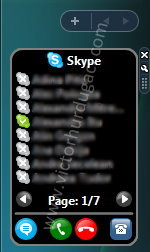
It integrates with the Sidebar, displays all your contacts and gives you options for call and chat.
Uses Skype4COM, a component offered by Skype, in order to communicate with the program so it might need administrative rights on the first run because of DLL registration.
The features of version 1.2:
- Contact list
- Small list and big list (8 or 16 contacts displayed at once)
- Start/end a call/chat with a contact
- Displays contact status (Available, SkypeMe, Away etc.)
- Call phone feature
System requirements:
- Windows Vista
- Skype
- Internet access
- Administrative rights on first run
For more details check the gadget’s page.
Installed the gadget and it will dial numbers already in my contact list. However, when I go to dial from within the gadget by entering the phone number, the green “dial” button does not function, no matter how many times I click it. Is this by design? Seems if it lets me enter a phone number in the gadget, it should dial that number.
It seems to work to me. The number you have typed includes also the country code?
Can you give me a number that is not working?
Same here. The numbers can be typed in, but the green call button does not function. Because I make calls all day, this would be a great feature.
OK, by adding +1 to the number, it worked. Guess I should have tried that earlier (silly me).
However, my OTHER problem is in regards to the list — some names have garbled text that only clears up when I click on the name. I wondered if the names before or after were too long and truncated to the next line, but editing names makes no difference. It’s like other text is super-imposed on the names in the contact list, but only on a couple in my list. All others appear fine.
(sidenote re: +1 addition)
Seems the Skype app automatically supplies the +1 — maybe the gadget could do the same??
I will try to fix the problem with the number ASAP.
About the OTHER problem, it’s a known problem and in the next version will be fixed.
Best regards and thanks for comments!